NAS HDD Temps
Sometimes problems cause headaches but are also great learning opportunities.
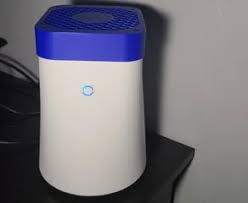
I knew my R1 Pro NAS was running hot, especially for my 2 14TB Toshiba Enterprise drives. Since I couldn't do much about airflow, I decided I needed to at least monitor them.
With the help of LLMs and extensive trial and error, I finalized a script. Scheduled via crontab, it runs every 5 minutes to check drive SMART data and temperatures, instantly informing me on my self hosted ntfy service if the thresholds have been crossed.
#!/bin/bash

# Set PATH explicitly for cron environment
export PATH="/usr/local/sbin:/usr/local/bin:/usr/sbin:/usr/bin:/sbin:/bin"

# Temperature thresholds (Celsius)
HDD_WARNING=48
HDD_CRITICAL=52
NVME_WARNING=65
NVME_CRITICAL=70

# Re-alert interval when a drive stays hot (seconds)
REALERT_INTERVAL=7200  # 2 hours

# Notification settings
NTFY_SERVER="https://notify.*MY-SERVER.COM"
NTFY_TOPIC="drive-alerts"
HOSTNAME=$(hostname)

# Debug mode - set to 1 to enable verbose output
DEBUG=0

# Log file for debugging cron issues
LOG_FILE="/tmp/temp-monitor.log"

# State directory for per-drive cooldown tracking
STATE_DIR="/var/lib/temp-monitor"
mkdir -p "$STATE_DIR"

# Function to log messages (useful for cron debugging)
log_message() {
    echo "$(date '+%Y-%m-%d %H:%M:%S'): $1" >> "$LOG_FILE"
}

# Send an ntfy notification
send_ntfy() {
    local title="$1"
    local message="$2"
    local priority="$3"
    local tags="$4"

    if command -v curl >/dev/null 2>&1; then
        response=$(curl -s -w "%{http_code}" \
            -H "Title: $title" \
            -H "Priority: $priority" \
            -H "Tags: $tags" \
            -d "$message" \
            "$NTFY_SERVER/$NTFY_TOPIC" 2>&1)
        if [ "$DEBUG" = "1" ]; then
            log_message "ntfy response: $response"
        fi
    else
        log_message "ERROR: curl command not found"
        echo "ERROR: curl command not found"
    fi
}

# Check temperature and send alert based on state transitions and re-alert interval
check_temp_alert() {
    local drive="$1"
    local temp="$2"
    local warn_threshold="$3"
    local crit_threshold="$4"
    local drive_name
    drive_name=$(basename "$drive")

    local current_time
    current_time=$(date +%s)

    # Read previous state: "<state> <last_alert_epoch>"
    local prev_state last_alert_time
    if [ -f "$STATE_DIR/${drive_name}.state" ]; then
        read -r prev_state last_alert_time < "$STATE_DIR/${drive_name}.state"
    else
        prev_state="ok"
        last_alert_time=0
    fi

    # Determine new state
    local new_state
    if [ "$temp" -ge "$crit_threshold" ]; then
        new_state="critical"
    elif [ "$temp" -ge "$warn_threshold" ]; then
        new_state="warning"
    else
        new_state="ok"
    fi

    [ "$DEBUG" = "1" ] && log_message "$drive: ${temp}°C | state: $prev_state -> $new_state"

    local time_since_last
    time_since_last=$(( current_time - last_alert_time ))

    if [ "$new_state" = "ok" ]; then
        # Drive recovered — notify once then reset state
        if [ "$prev_state" != "ok" ]; then
            local msg="RESOLVED: Drive $drive temperature is back to normal at ${temp}°C on $HOSTNAME"
            log_message "$msg"
            echo "ok $current_time" > "$STATE_DIR/${drive_name}.state"
            send_ntfy "Drive Temperature Resolved - $HOSTNAME" "$msg" "low" "white_check_mark,thermometer"
        fi
    else
        # Alert on state change (ok→warning, warning→critical, etc.)
        # or re-alert after REALERT_INTERVAL if drive is still hot
        local should_alert=false
        if [ "$new_state" != "$prev_state" ] || [ "$time_since_last" -ge "$REALERT_INTERVAL" ]; then
            should_alert=true
        fi

        if [ "$should_alert" = true ]; then
            local title msg priority tags
            if [ "$new_state" = "critical" ]; then
                priority="urgent"
                tags="rotating_light,thermometer"
                title="CRITICAL: Drive Temperature Alert - $HOSTNAME"
                msg="CRITICAL: Drive $drive temperature is ${temp}°C (critical threshold: ${crit_threshold}°C) on $HOSTNAME"
            else
                priority="high"
                tags="warning,thermometer"
                title="WARNING: Drive Temperature Alert - $HOSTNAME"
                msg="WARNING: Drive $drive temperature is ${temp}°C (warning threshold: ${warn_threshold}°C) on $HOSTNAME"
            fi
            log_message "ALERT: $msg"
            echo "$new_state $current_time" > "$STATE_DIR/${drive_name}.state"
            send_ntfy "$title" "$msg" "$priority" "$tags"
        fi
    fi
}

# Send a SMART health ntfy notification
send_smart_alert() {
    local drive="$1"
    local issue="$2"
    local message="SMART WARNING: Drive $drive - $issue on $HOSTNAME"
    log_message "SMART ALERT: $message"
    send_ntfy "SMART Health Alert - $HOSTNAME" "$message" "urgent" "warning,hard_disk"
}

# Check SMART health (single smartctl -A call per drive, 24h alert cooldown)
check_smart_health() {
    local drive="$1"
    local drive_name
    drive_name=$(basename "$drive")

    if ! command -v smartctl >/dev/null 2>&1; then
        log_message "ERROR: smartctl command not found for $drive"
        return 1
    fi

    # Skip if drive is in standby — avoids spinning it up just for a SMART check.
    # smartctl -n standby exits with rc bit 1 set (rc & 2) when drive is in standby/sleep.
    smartctl -n standby -i "$drive" > /dev/null 2>&1
    if (( $? & 2 )); then
        [ "$DEBUG" = "1" ] && log_message "SMART check skipped for $drive — drive in standby"
        return 0
    fi

    # 24h cooldown: persistent SMART issues don't need repeated hourly alerts
    local current_time
    current_time=$(date +%s)
    local smart_state_file="$STATE_DIR/${drive_name}.smart_last_alert"
    local last_smart_alert=0
    [ -f "$smart_state_file" ] && last_smart_alert=$(cat "$smart_state_file")

    if [ $(( current_time - last_smart_alert )) -lt 86400 ]; then
        [ "$DEBUG" = "1" ] && log_message "SMART cooldown active for $drive, skipping"
        return
    fi

    local alerts_sent=false

    # Overall health check
    local health_status
    health_status=$(smartctl -n standby -H "$drive" 2>/dev/null | grep -i "overall-health" | awk '{print $6}')
    if [ -n "$health_status" ] && [ "$health_status" != "PASSED" ]; then
        send_smart_alert "$drive" "Overall health status: $health_status"
        alerts_sent=true
    fi

    # Single -A call: parse all attributes at once
    local smart_attrs val
    smart_attrs=$(smartctl -n standby -A "$drive" 2>/dev/null)

    val=$(echo "$smart_attrs" | grep -i "reallocated_sector" | awk '{print $10}')
    if [ -n "$val" ] && [ "$val" -gt 0 ] 2>/dev/null; then
        send_smart_alert "$drive" "Reallocated sectors detected: $val"
        alerts_sent=true
    fi

    val=$(echo "$smart_attrs" | grep -i "current_pending_sector" | awk '{print $10}')
    if [ -n "$val" ] && [ "$val" -gt 0 ] 2>/dev/null; then
        send_smart_alert "$drive" "Pending sectors detected: $val"
        alerts_sent=true
    fi

    val=$(echo "$smart_attrs" | grep -i "offline_uncorrectable" | awk '{print $10}')
    if [ -n "$val" ] && [ "$val" -gt 0 ] 2>/dev/null; then
        send_smart_alert "$drive" "Uncorrectable errors detected: $val"
        alerts_sent=true
    fi

    val=$(echo "$smart_attrs" | grep -i "command_timeout" | awk '{print $10}')
    if [ -n "$val" ] && [ "$val" -gt 0 ] 2>/dev/null; then
        send_smart_alert "$drive" "Command timeouts detected: $val"
        alerts_sent=true
    fi

    val=$(echo "$smart_attrs" | grep -i "spin_retry_count" | awk '{print $10}')
    if [ -n "$val" ] && [ "$val" -gt 0 ] 2>/dev/null; then
        send_smart_alert "$drive" "Spin retry events detected: $val"
        alerts_sent=true
    fi

    val=$(echo "$smart_attrs" | grep -i "media_and_data_integrity_errors" | awk '{print $2}')
    if [ -n "$val" ] && [ "$val" -gt 0 ] 2>/dev/null; then
        send_smart_alert "$drive" "Media and data integrity errors detected: $val"
        alerts_sent=true
    fi

    [ "$alerts_sent" = true ] && echo "$current_time" > "$smart_state_file"
}

# Log script start
log_message "Temperature monitoring script started"

# Skip HDD temperature alerts while drives are intentionally spun down.
# Spindown causes drives to cool artificially — checking temps during that
# window produces false "resolved" and "critical" transitions on every cycle.
HDD_SPINDOWN_FLAG="/var/lib/hdd-spindown/sleeping"

# Check if smartctl is available
if ! command -v smartctl >/dev/null 2>&1; then
    log_message "ERROR: smartctl command not found. Install smartmontools package."
    echo "ERROR: smartctl command not found. Install smartmontools package."
    exit 1
fi

# Check all present HDDs
for drive in /dev/sd[a-z]; do
    if [ -e "$drive" ]; then
        if [ -f "$HDD_SPINDOWN_FLAG" ]; then
            log_message "Skipping $drive temperature check — drives are in spindown"
            continue
        fi
        log_message "Checking HDD: $drive"
        temp=$(smartctl -n standby -A "$drive" 2>/dev/null | grep -i temperature | awk '{print $10}' | head -1)
        [ "$DEBUG" = "1" ] && log_message "$drive: ${temp}°C (warn: ${HDD_WARNING}°C, crit: ${HDD_CRITICAL}°C)"
        [ -n "$temp" ] && check_temp_alert "$drive" "$temp" "$HDD_WARNING" "$HDD_CRITICAL"
        check_smart_health "$drive"
    fi
done

# Check NVMe drives (only namespaces, not partitions or controllers)
for drive in /dev/nvme*n[0-9]*; do
    if [ -e "$drive" ] && [[ ! "$drive" =~ p[0-9]+$ ]]; then
        log_message "Checking NVMe: $drive"
        temp=$(smartctl -A "$drive" 2>/dev/null | grep -i temperature | awk '{print $2}' | head -1)
        [ "$DEBUG" = "1" ] && log_message "$drive: ${temp}°C (warn: ${NVME_WARNING}°C, crit: ${NVME_CRITICAL}°C)"
        [ -n "$temp" ] && check_temp_alert "$drive" "$temp" "$NVME_WARNING" "$NVME_CRITICAL"
        check_smart_health "$drive"
    fi
done

log_message "Temperature monitoring script completed"
Since summers in Greece can be pretty brutal, as soon as ambient temperatures rose, I started getting a lot of notifications of my drives crossing the temp thresholds I'd set.
Shutting down my NAS isn't really an option since I have a lot of services running, including Plex, serving my family and friends.
Next, I thought of HDD spindown. If the server isn't being used then the HDDs should spindown and enter a "dormant" state only to be waken up when they're actually used.
Again with the help of LLMs and A LOT of trial and error I got this script running, which basically checks if anyone is watching Plex, if a torrent is downloading/seeding or if the drives are idle in the last half hour. If those conditions are met, the script puts them on spin down, hence saving some energy and crucially cooling them down.
#!/bin/bash
# Idle-based HDD spindown for ZFS tank pool
# /usr/local/bin/hdd-spindown.sh
#
# Cron: */5 * * * * /usr/local/bin/hdd-spindown.sh

export PATH="/usr/local/sbin:/usr/local/bin:/usr/sbin:/usr/bin:/sbin:/bin"

# ── Configuration ─────────────────────────────────────────────────────────────
DRIVES=(/dev/sda /dev/sdb)
POOL="tank"
IDLE_MINUTES=30               # Spin down after this many minutes of inactivity
IO_SAMPLE_SECS=3              # Seconds to sample diskstats
IO_THRESHOLD_KB=100           # KB/s — below this is considered idle
PLEX_URL="http://192.168.2.***:32400"
PLEX_TOKEN="MY-SECRET-TOKEN"

STATE_DIR="/var/lib/hdd-spindown"
LOG_FILE="/var/log/hdd-spindown.log"
LAST_ACTIVE_FILE="$STATE_DIR/last_active"
SLEEPING_FLAG="$STATE_DIR/sleeping"
# ──────────────────────────────────────────────────────────────────────────────

mkdir -p "$STATE_DIR"

log() { echo "$(date '+%Y-%m-%d %H:%M:%S'): $1" >> "$LOG_FILE"; }

# ── Are drives sleeping? (tracked via flag file — avoids hdparm -C waking them) ─
# The flag is set when we spin down, and cleared when we detect I/O resumed
# (i.e. diskstats show sectors read/written since last check).
drives_sleeping() {
    [ -f "$SLEEPING_FLAG" ] || return 1

    # Verify via a quick diskstats check — if sectors moved, someone woke them
    local total_before=0
    for drive in "${DRIVES[@]}"; do
        local dev sectors
        dev=$(basename "$drive")
        sectors=$(awk -v d="$dev" '$3==d{print $6+$10}' /proc/diskstats)
        total_before=$(( total_before + ${sectors:-0} ))
    done
    sleep 1
    local total_after=0
    for drive in "${DRIVES[@]}"; do
        local dev sectors
        dev=$(basename "$drive")
        sectors=$(awk -v d="$dev" '$3==d{print $6+$10}' /proc/diskstats)
        total_after=$(( total_after + ${sectors:-0} ))
    done

    if [ "$total_after" -gt "$total_before" ]; then
        log "Drive I/O detected — drives woke externally, clearing sleep flag"
        rm -f "$SLEEPING_FLAG"
        echo "$(date +%s)" > "$LAST_ACTIVE_FILE"
        return 1
    fi
    return 0
}

# ── Active Plex sessions? ─────────────────────────────────────────────────────
plex_is_idle() {
    local response
    response=$(curl -sf --connect-timeout 3 \
        "${PLEX_URL}/status/sessions?X-Plex-Token=${PLEX_TOKEN}" 2>/dev/null)

    if [ -z "$response" ]; then
        log "WARNING: Plex unreachable at $PLEX_URL — assuming idle"
        return 0
    fi

    # size="0" = no active sessions
    echo "$response" | grep -q 'size="0"'
}

# ── ZFS scrub in progress? ────────────────────────────────────────────────────
scrub_active() {
    zpool status "$POOL" 2>/dev/null | grep -q "scrub in progress"
}

# ── Disk I/O above threshold? (samples diskstats, no disk wakeup) ─────────────
disk_is_idle() {
    local total_before=0 total_after=0

    for drive in "${DRIVES[@]}"; do
        local dev sectors
        dev=$(basename "$drive")
        sectors=$(awk -v d="$dev" '$3==d{print $6+$10}' /proc/diskstats)
        total_before=$(( total_before + ${sectors:-0} ))
    done

    sleep "$IO_SAMPLE_SECS"

    for drive in "${DRIVES[@]}"; do
        local dev sectors
        dev=$(basename "$drive")
        sectors=$(awk -v d="$dev" '$3==d{print $6+$10}' /proc/diskstats)
        total_after=$(( total_after + ${sectors:-0} ))
    done

    # Sectors are 512 bytes; convert to KB/s
    local sectors_diff=$(( total_after - total_before ))
    local kb_per_sec=$(( sectors_diff * 512 / IO_SAMPLE_SECS / 1024 ))

    log "I/O sample: ${kb_per_sec} KB/s (threshold: ${IO_THRESHOLD_KB} KB/s)"
    [ "$kb_per_sec" -lt "$IO_THRESHOLD_KB" ]
}

# ── Spin down all drives ──────────────────────────────────────────────────────
do_spindown() {
    log "Spinning down: ${DRIVES[*]}"
    zpool sync "$POOL" 2>/dev/null || true
    sleep 2
    for drive in "${DRIVES[@]}"; do
        if [ -e "$drive" ]; then
            hdparm -y "$drive" >> "$LOG_FILE" 2>&1
        fi
    done
    touch "$SLEEPING_FLAG"
    log "Spindown complete"
}

# ── Main ──────────────────────────────────────────────────────────────────────
now=$(date +%s)

# Nothing to do if drives are already sleeping (flag + diskstats confirm)
if drives_sleeping; then
    exit 0
fi

# Initialize last_active on first ever run (avoid immediate spindown)
if [ ! -f "$LAST_ACTIVE_FILE" ]; then
    log "First run — initializing activity timestamp"
    echo "$now" > "$LAST_ACTIVE_FILE"
    exit 0
fi

# Block: scrub in progress
if scrub_active; then
    log "ZFS scrub in progress — skipping"
    echo "$now" > "$LAST_ACTIVE_FILE"
    exit 0
fi

# Block: active Plex session
if ! plex_is_idle; then
    log "Active Plex session — drives stay up"
    echo "$now" > "$LAST_ACTIVE_FILE"
    exit 0
fi

# Block: disk I/O above threshold (this takes IO_SAMPLE_SECS seconds)
if ! disk_is_idle; then
    log "Disk I/O active — updating last_active"
    echo "$now" > "$LAST_ACTIVE_FILE"
    exit 0
fi

# All checks passed — have we been idle long enough?
last_active=$(cat "$LAST_ACTIVE_FILE")
idle_seconds=$(( now - last_active ))
idle_minutes=$(( idle_seconds / 60 ))

if [ "$idle_seconds" -lt $(( IDLE_MINUTES * 60 )) ]; then
    log "Idle for ${idle_minutes}m/${IDLE_MINUTES}m — not yet"
    exit 0
fi

do_spindown
This was however not the final solution I had envisioned since usage on my NAS is pretty high and the drives don't have any time idle, other than the middle of the night.
Last hope was embracing the JUNK! 😂
I had already replaced the 92mm fan in the R1 Pro with a Noctua (which helped with temps). I hot-plugged the original, lower-quality fan to a 12V power supply and installed it to the top of the case as an exhaust!
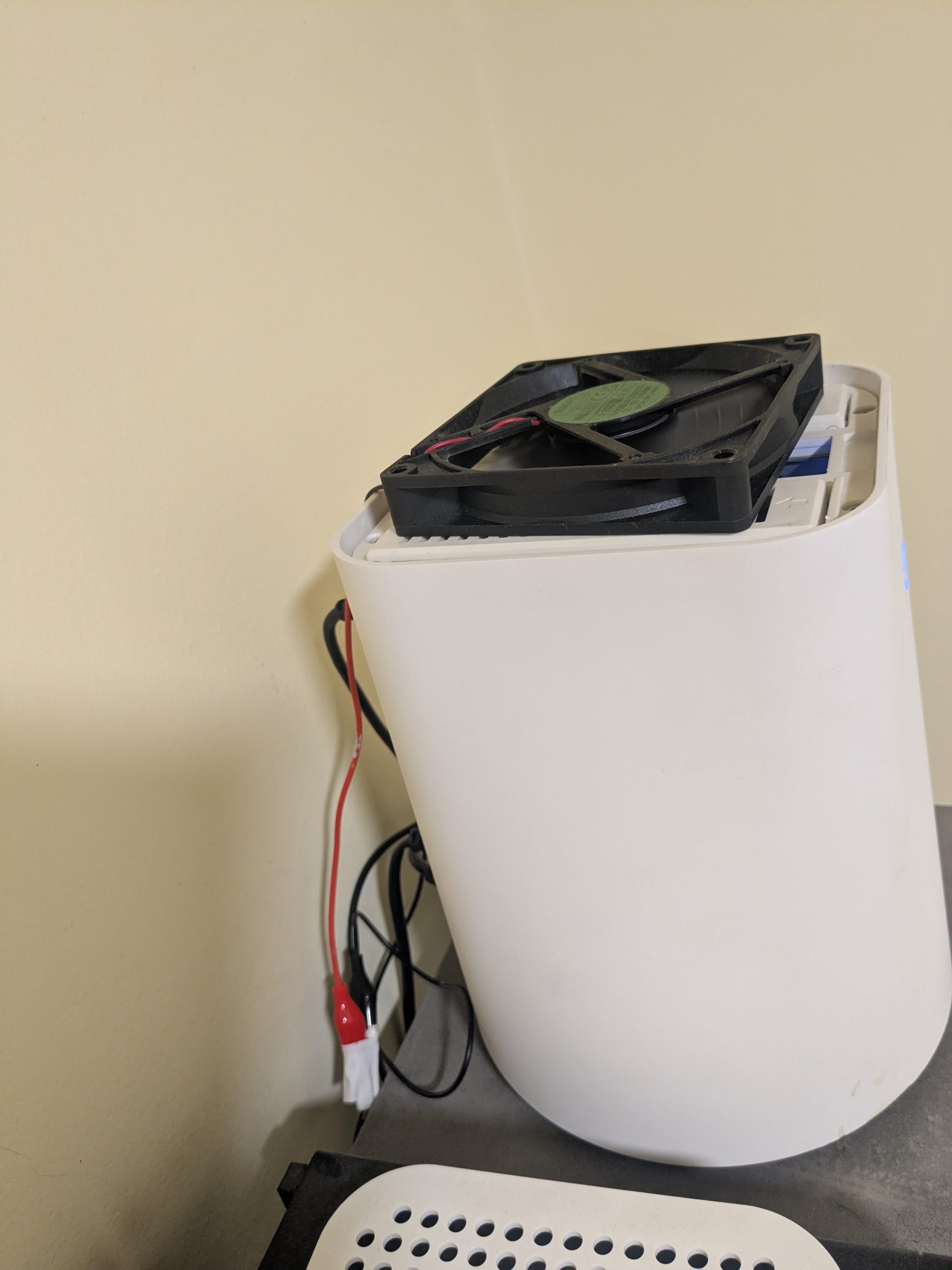
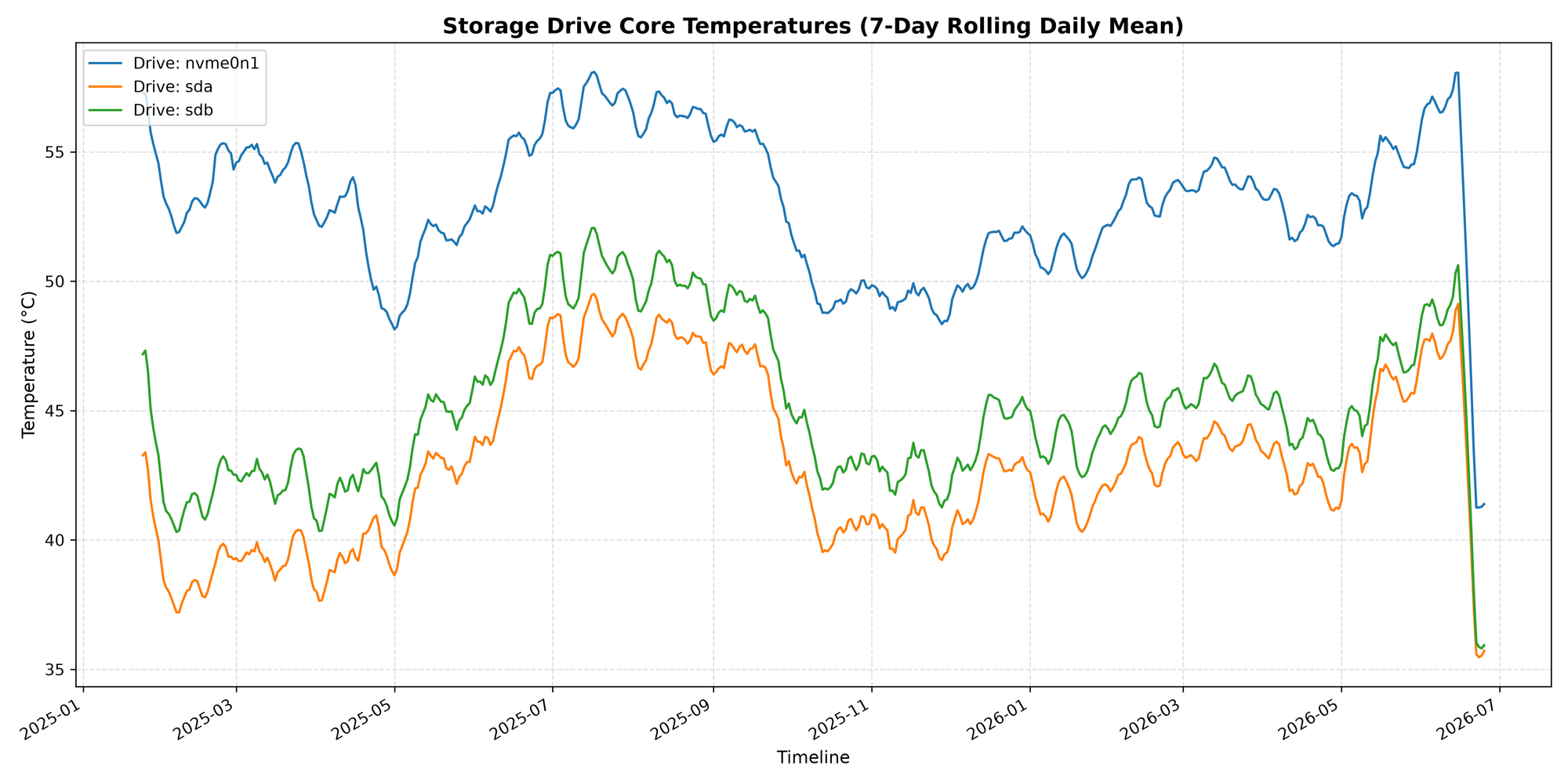
Fortunately this worked immediately and I saw drops of ~15c across all my drives.
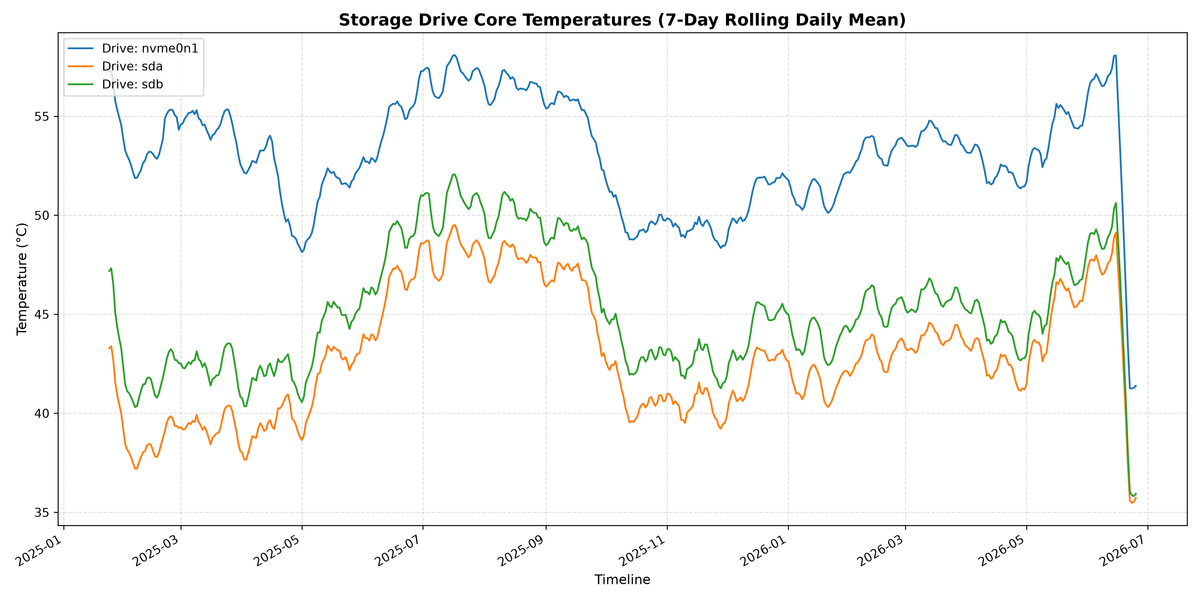
Last learning opportunity for this particular problem was some data analysis using python and matplotlib. The python scripts connects to my server via ssh, locates the temperature.log file with the raw data that are generated every hour from the temperature script running, copies it locally via scp, and pandas and matplotlib work their magic.
The end result is this giant drop in temperature in June 2026
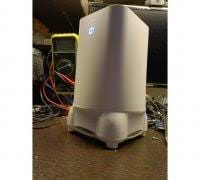
Maybe the junk doesn't last long and I get my self a 3d printer to make one of the following